How is everyone handling physical Smart TV / OTT automation without losing their minds?

Hi everyone,

I’m a test engineer focusing heavily on Smart TVs and OTT devices (Tizen, webOS, Roku, Apple TV). For the longest time, our lab was just a wall of 10-15 different TVs, and running cross-platform UI tests or checking A/V sync meant physically sitting in front of them with 10 different remotes.

I got so frustrated that I ended up building an internal tool to solve this: a remote device farm that bridges physical TVs to a web browser using WebRTC cameras and a virtual remote (basically, pointing an Android phone at the TV to capture 30/60fps video and act as a Bluetooth/Network remote).

It’s grown into a SaaS project (QAUltra) and we are currently in closed beta.

I’m curious how are other teams handling this? Are you relying purely on emulators (which miss hardware video decoding bugs), building in-house Appium rigs, or using something else?

Also, if anyone here is currently stuck testing physical TVs and wants to try out our beta for free, let me know! I’d love to get feedback from actual QA engineers on how to make the virtual remote and A/V sync tools better.
OK so now wait, let me get this straight, you turned your test framework into an actual product, which you now intend to release/ship to external customers whom you do not actually yet know?

What is a WebRTC camera, is it an optical camera, or a stream scraper? I’m assuming the former from your description. Which feels very generic, almost too generic and too noisy to be useful as a “video quality” regression test tool. I’m also assuming some people with physical TV’s are often not driving real displays, because all the box really needs is a EDID and something to send pixels to. Fascinating. Only every did this kind of thing at very small scale and in a mobile context myself. But WebRTC is definitely the protocol to be studying up on and using.

I’m in a very different embedded space these days, my last 2 jobs actually have gone solidly away from mobile, but still find this fascinating. Good luck.

Haha, exactly! We built it to scratch our own massive itch, and once we realized how much time it saved our remote team, productizing it for others just made sense.

You hit the absolute nail on the head regarding the optical camera approach being too noisy for strict video quality regression (like PSNR/VMAF pixel-matching). To clarify though, QAUltra isn’t just for video streaming apps it’s built for testing all kinds of Smart TV/OTT apps (e-commerce, fitness, casual games, or just general UI/functional testing). For those use cases, you don’t need pixel perfect uncompressed video, you just need to see how the UI reacts to real remote inputs in real time.

Because of those different needs, QAUltra actually operates in two different modes:

  1. The Lens App (Optical): This is for all-in-one Smart TVs (Tizen/webOS) where you physically cannot intercept the video output. We use the phone to stream the TV to the browser. It’s for manual exploratory testing, UI functional checks, and catching macro issues (like hard freezes or layout bugs) when QA is working from home.

  2. The Rack Agent (Hardware): For OTT boxes (Roku, Apple TV, Google TV, FireTV etc), we do exactly what you described! We use headless HDMI capture cards (with EDID spoofing). Our agent grabs the raw HDMI feed, hardware-encodes it via HW NVENC (or SW h264), and pipes it directly into the WebRTC stream for a pristine, lossless feed.

And yes, WebRTC is the absolute MVP here. We actually just finished deploying edge relays (in Germany and Tokyo) so that a dev in Asia can control a physical Roku in Europe with lowest possible latency over TCP. It’s been a wild networking challenge.

Really appreciate the kind words and the good luck!

Did a bit of ROKU research for a job interview once. This was right up my street at the time, off the back of a job that involved video codec quality. The one exercise we did before the company I worked for got sold to a US owner was an experiment to gauge perceived video quality. It was a weird test where we did video playback on 2 screens, but unknown to the casual users we sat in front of each screen, we tweaked the codecs and used a switch-box. We set up lighting and comfy chair and had a bowl full of chocolates nearby as a reward for each victim of our test. And it was remarkable, because for some codec versions we actually got lower digital fidelity, but consistently higher scores from humans. Humans eyes see not only motion, but also colour differently to how a machine does, but in very subtle ways that are hard to actually nail down in a measurement. That experience, was a long time ago, but it made me question, the questions I ask as a tester today whenever I look at binary correctness as the assumed correct answer to a test outcome. Sometimes all you need is something very responsive and that looks roughly right. We had a very small test team and a very small test farm, so we never tried to automate to the scale you describe.

I have once done “test farm” or device-as-a-service myself, and it really is fun. When you get that ability to conjure up a test target and control it smoothly over a network API that you yourself built, then the ability to run a test against multiple device models and environments is so sweet and powerful as a tool on it’s own to validate software correctness. Better get back to my day job, inspired.

That experiment with the chocolates sounds like a classic piece of perceptual quality research! It is a great reminder that the human eye is often the most sophisticated test tool we have. a machine might see a lower digital bitrate as a failure, but if a human sees smooth motion and vibrant color, it’s a success for the product.

Your point about responsiveness vs binary correctness is actually the core philosophy behind why I chose WebRTC for this project. In our space, a tester would much rather have a roughly right 30/60fps image with 50ms of latency than a pixel perfect 4K image with a 2-second delay. If the remote control doesn’t feel instant, you lose that human feel of the UI, and you can’t catch the subtle navigation stutters or focus loss bugs that actually annoy real users.

There is definitely something about conjuring up a device in a different country and controlling it as if it were on your desk. It turns the nightmare of fragmentation into a manageable (and fun) engineering challenge.

Thanks for the perspective, Conrad it’s a great reminder to keep us humans in the loop even as we try to automate the world!

As a programmer-turned-tester, the perceptual research thing really did go against my grain as a person who is a bit keen on PASS-FAIL tests and absolutes. It also treads on my toes as a programmer, because it’s a technique that tries to ignore everything happening in between the user and the original digital data being transmitted. My programmer mindset tells me that all bugs hide in the hotspots of the architecture and in the code. Bugs occur in the specific places where they seem to congregate in the architecture or frameworks just because of how the specific moving parts by nature, introduce known issues. It’s just how hardware and software are created around the resource limitations of each component, and so many defect types, tend to sit in those specific areas.

So yeah, stepping back and looking at just the end result is a humbling lesson. Often there is no binary PASS/FAIL. Sometimes I find a hard to test feature and instead of trying to test it’s path through the architecture, it does help to step back and verify that the rough outcome is met. Because that’s what the customer is paying for, they are not paying for your M2 processor or your brand new AI algorithm. “Eye” type robots are thus, in my experience, very good at catching things like stutter if you program them right. Very often, “good enough” is in reality “good enough as a test”.

@qaultradev : for Roku , I tried Writing your first test - Stb-tester Manual and it worked for me.

Other then that asked to dev team to create customised build for testing and can use some customised hooks that help to automate

Totally agree. Letting go of the strict binary PASS/FAIL mindset is definitely tough for us engineer-types! But like you said, the customer is paying for the final experience, not the architecture. Finding that good enough threshold for visual testing really is an art.

Thanks for sharing your approach! Relying on custom dev builds and internal automation hooks is a very common workaround, but it can definitely become a headache when you want to test the pure retail environment.

That is actually one of the main reasons we built QAUltra to be completely out of band and hybrid:

1. Hybrid Hardware Support (HDMI + Optical):
For OTT boxes (Roku, Fire TV, Google TV, Android STBs), we use headless HDMI capture cards on a server rack. However, since modern Smart TVs (Samsung Tizen / LG webOS) don’t have HDMI-out ports, we bridge that gap by letting you mount a spare Android phone in front of the TV. The phone captures the screen and streams it via 60fps WebRTC back to your browser.

2. Zero Custom Hooks Required:
Because we emulate actual Bluetooth HID or the manufacturer’s native LAN remote protocols, you don’t need to ask the dev team for custom builds with testing hooks. You control and test the exact retail production app that the end user sees.

3. “BrowserStack” style manual access:
We prioritized ultra-low latency (sub-50ms) video and a virtual remote so a developer sitting at home can manually debug an app on a physical office TV in real-time.

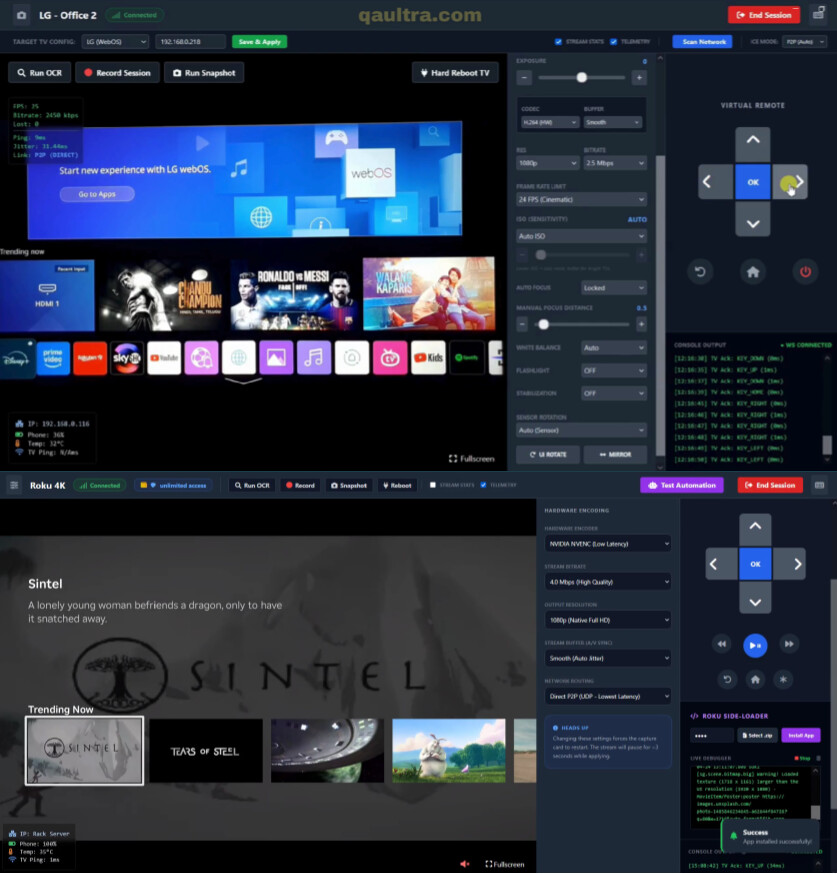
To give you an idea of how the two different modes look in practice:

Attached is a screenshot of controlling an LG TV using the QAUltra Lens app.

Also attached is a screenshot of testing a Roku via our HDMI rack agent (showing the side-loader and live debugger).

That being said, full automation is absolutely on our roadmap! We are currently building out native Computer Vision (CV) capabilities and CI/CD integrations. The ultimate goal is to give QA teams a single platform where they can run automated visual regression pipelines in CI, and then instantly jump into a live WebRTC session to manually debug if a test fails.

We are currently in closed beta, but if you or anyone else here wants to test it out on your own hardware, just send a request using the contact form at https://qaultra.com/ and I’ll get you set up. I’d love to get your feedback!