I’m very new to .NET/C# and am running into a recurring error I can’t get my head around with my foundation certificate test automation framework…
If I run my UNIT/API/E2E tests within Visual Studio Test Explorer they run successfully, but if I try to run the tests programmatically using a command like:
<dotnet test --filter FullyQualifiedName~Timesheet.Test.UNIT>
…then I will get an error message like:
“Starting test execution, please wait…
total of 1 test files matched the specified pattern.
No test matches the given testcase filter FullyQualifiedName~Timesheet.Test.UNIT”
So my tests will build on the pipeline without issue but they do not actually execute so the test results just show “No tests found”.
I believe all the necessary Packages are installed and up to date, but perhaps something is not being referenced correctly in the project and/or tests?
I’ve attached my Timesheet.Test.csproj and AuthDBTest.cs files for reference below.
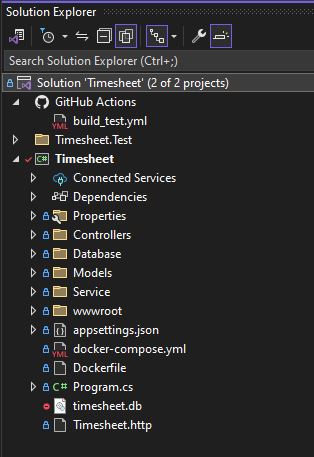
Could you share a bit more detail as to where the test is stored within your repository. I have a suspicion of what might be going on, but will need to understand where your test file is first.
Hi Mark, yes I’ve been using Visual Studio for the course and did suspect that the way I have the project structured may be wrong and that the Timesheet.Test folder should be within the Timesheet project? (Not as another project within the Solution).
OK so these 3 commands seem to work
dotnet test Timesheet --filter Timesheet.Test.Unit
dotnet test Timesheet --filter Timesheet.Test.API
dotnet test Timesheet --filter Timesheet.Test.E2E
So I’m now seeing Test Results in GitHub Actions
(Only E2E test is failing because headless Chrome is trying to run v126 and not v127 as expected by Chromedriver)